8/22/2018

PhotoScape

PhotoScape

Download

PhotoScape是一款多功能的照片編輯軟體,支援繁體中文版免費下載,相片模版拼貼、修圖、照片剪裁和增加效果、製作動畫等超好用工具,本站提供最新版的PhotoScape 3.7官方載點供大家使用,支援Mac、Windows系統。
  • 查看: 查看你的照片文件夾,創建幻燈片模式
  • 編輯: 縮放,顏色和亮度調整,白平衡,背光修正,加邊框,氣泡提示,馬賽克,添加文字,繪畫圖片,剪裁,濾鏡,去紅眼,模糊, 筆刷, 橡皮圖章, 效果筆刷
  • 批處理: 一次性編輯多張照片
  • 頁面設計: 合並多張照片到一張
  • 合並照片: 可以垂直或水平合並多張照片到一張照片
  • GIF 動畫制作: 用多張圖片來制作 GIF 動畫
  • 打印: 打印證件照,CD 封套,護照照片
  • 分割: 把圖片切割成不同的部分
  • 截屏: 捕捉屏幕並保存
  • 顏色選取: 放大照片,搜索或選取顏色
  • 改名: 一次性修改多找照片名字
  • RAW 轉換: 可以轉化 RAW 格式到 JPG
  • 紙張打印: 打印信紙,圖表,樂譜,日歷
  • 面部搜索: 在互聯網上搜索相近的面孔

NewFileTime

NewFileTime

Download

修改檔案時間的軟體 - NewFileTime,簡單實用的檔案日期修改工具,可以透過拖曳或匯入資料夾的方式大量修改檔案時間,指定檔案的日期及時間(修改日期、建立日期、存取日期),更改為更早或更晚的時間。

FreeFileSync

FreeFileSync

Download

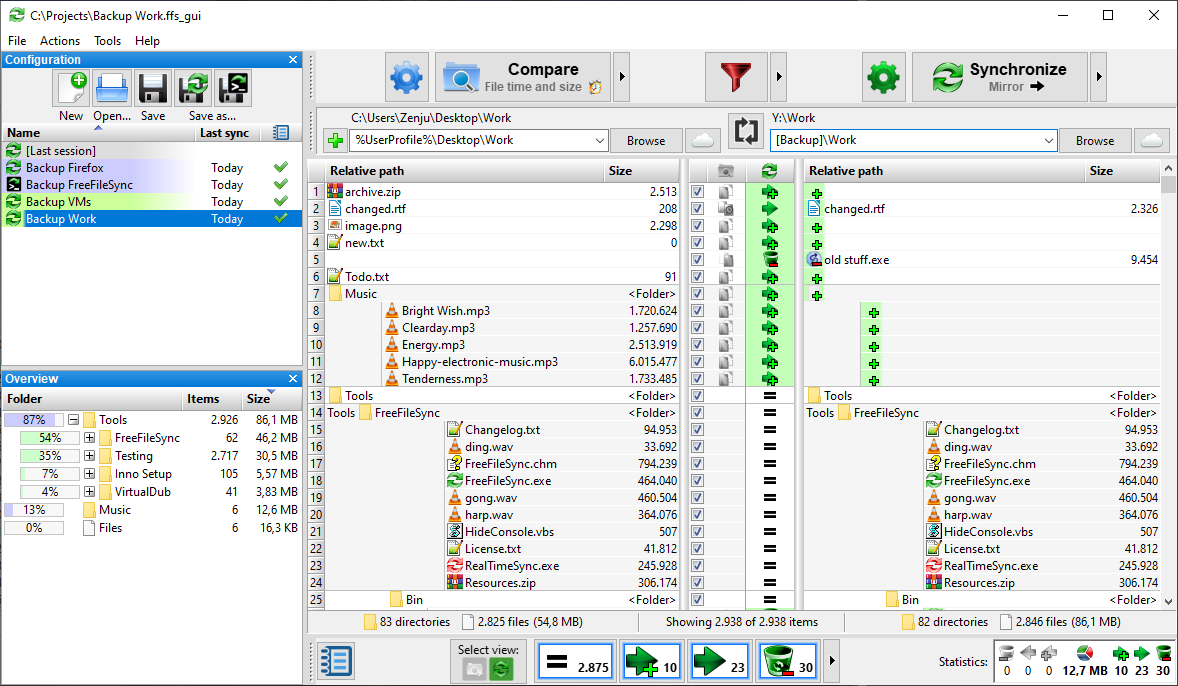
FreeFileSync 是一個檔案的比對,同步的工具,一般來說我們同步檔案的目的常用於備份資料上,但是由於資料可能會有相同的情況,尤其是當我們每天從A硬碟備份資料至B硬碟時,這種情況是一定會發生的。而這時我們可以藉由 FreeFileSync 這套超強的檔案比對軟體,來幫我們選出來源資料夾與目的資料夾不同的檔案,並且自己決定同步的方式,看是要同步成兩顆硬碟的資料完全一樣,還是說僅更新一邊擁有的資料等,非常地彈性。本文提供了 FreeFileSync 的下載點及使用教學,有需要的朋友可以自行下載 FreeFileSync,並且依 FreeFileSync 的教學來操作一遍唷!

8/15/2018

Notepad

Notepad++

Download

是一套自由軟件的純文字編輯器,截止到2011年,已被下載超過2700萬次,並兩度獲得SourceForge社群選擇獎——最佳開發工具。
該軟件以GPL發佈,有完整的中文化介面及支援多國語言撰寫的功能(採用UTF-8技術)。它的功能比Windows中的記事本(Notepad)強大,除了可以用來製作一般的純文字的說明文件,也十分適合用作撰寫電腦程式的編輯器。由6.2.3版本起,Notepad++的文件預設文字格式由ANSI改為除去BOM的UTF8(UTF8 without BOM)。Notepad++不僅有語法高亮度顯示,也有語法摺疊功能,並且支援巨集以及擴充基本功能的外掛模組。

8/08/2018

jQuery attr

jQuery 屬性操作 - attr() 方法


方法描述
addClass()向匹配的元素添加指定的類名。
attr()設置或返回匹配元素的屬性和值。
hasClass()檢查匹配的元素是否擁有指定的類。
html()設置或返回匹配的元素集合中的 HTML 內容。
removeAttr()從所有匹配的元素中移除指定的屬性。
removeClass()從所有匹配的元素中刪除全部或者指定的類。
toggleClass()從匹配的元素中添加或刪除一個類。
val()設置或返回匹配元素的值。
00

jQuery attr

jQuery 屬性操作 - attr() 方法


方法描述
addClass()向匹配的元素添加指定的類名。
attr()設置或返回匹配元素的屬性和值。
hasClass()檢查匹配的元素是否擁有指定的類。
html()設置或返回匹配的元素集合中的 HTML 內容。
removeAttr()從所有匹配的元素中移除指定的屬性。
removeClass()從所有匹配的元素中刪除全部或者指定的類。
toggleClass()從匹配的元素中添加或刪除一個類。
val()設置或返回匹配元素的值。
00

8/07/2018

get Browser

get Browser

瀏覽器代號    navigator.appCodeName
瀏覽器名稱    navigator.appName
版本信息        navigator.appVersion
是否啟用        navigator.cookieEnabled
硬件平台        navigator.platform
用戶代理        navigator.userAgent
脫機模式        navigator.onLine
語系編碼        navigator.language
00

get Browser

get Browser

瀏覽器代號    navigator.appCodeName
瀏覽器名稱    navigator.appName
版本信息        navigator.appVersion
是否啟用        navigator.cookieEnabled
硬件平台        navigator.platform
用戶代理        navigator.userAgent
脫機模式        navigator.onLine
語系編碼        navigator.language
00

8/06/2018

HTML ul li 項目標籤

HTML <ul> <ol> <li> <dl> <dt> <dd> 項目標籤

00
00
00
00
00

HTML ul li 項目標籤

HTML <ul> <ol> <li> <dl> <dt> <dd> 項目標籤

HTML <ul> <li> 標籤用來定義一個無排序的項目清單列表。
00
00
00
00
#HTML ul li 項目標籤

8/05/2018

toLowerCase

input text, onchange, toLowerCase(), toUpperCase(),


<input type="text" placeholder="input Lower case" onchange="this.value=this.value.toUpperCase()">輸入小寫英文轉為大寫

<input type="text" placeholder="input Upper case"  onchange="this.value=this.value.toLowerCase()">輸入大寫英文轉為小寫

placeholder 是HTML5裡的新屬性, 該屬性可在文字框中顯示提示訊息, 提示訊息會在文字中為空時顯示,並在輸入內容後消失。

onmouseover="this.select()" 滑鼠移過去內容就換自動反白。

toUpperCase()   輸入大寫英文轉為小寫。

toLowerCase()  輸入大寫英文轉為小寫。


00

toLowerCase

input text, onchange, toLowerCase(), toUpperCase(),


<input type="text" placeholder="input Lower case" onchange="this.value=this.value.toUpperCase()">輸入小寫英文轉為大寫

<input type="text" placeholder="input Upper case"  onchange="this.value=this.value.toLowerCase()">輸入大寫英文轉為小寫

placeholder 是HTML5裡的新屬性, 該屬性可在文字框中顯示提示訊息, 提示訊息會在文字中為空時顯示,並在輸入內容後消失。

onmouseover="this.select()" 滑鼠移過去內容就換自動反白。

toUpperCase()   輸入大寫英文轉為小寫。

toLowerCase()  輸入大寫英文轉為小寫。


00

8/02/2018

CSS before after

CSS before after

00

CSS before after

CSS content 屬性與 :before 及 :after 偽元素配合使用,來插入生成內容。before after

<style>
     .Ap::before {content: "before \21D2"; }
     .Ap::after {content: "\21D0 after"; }
     #hometown::before {   content: ''; }
</style>
<p class="Ap">123456</p>
<p id="hometown">123456</p>

123456

123456

<style>
     .Bp {counter-increment: myIndex; }
     .Bp::before {  content:counter(myIndex) "\21d2" ; }
</style>
<p class="Bp">ABC</p>

ABC

ABC

ABC

ABC

ABC

<style>
a::before {  content: attr(href); }
</style>
<a href="https://html.ug5g.com/2018/08/css-before-after.html">ug5g.com</a>
ug5g.com
<style>
      p::before {  content: open-quote;}
      p::after {  content: close-quote;}
</style>
<p>123456</p>

123456

.A3::before {
  content: url(xxx.jpg);}
.A3::after {  content: url(xxx.jpg);}
</style>
<p class="A3"> 12345 </p>

12345


00
#CSS before after#CSS content#css content:counter

Math.random

Math.random 取得亂數

Math.random()函式,這個函數會隨機產生出0~1之間的小數。
Math.floor()函式,最大整數。
00

Math.random

Math.random 取得亂數

Math.random()函式,這個函數會隨機產生出0~1之間的小數。
Math.floor()函式,最大整數。
00

getElementById

document.getElementById(id).innerHTML

00

getElementById(id) getElementsByName(name)

document.getElementById(id) 取得 id 的元素
document.getElementsByName(name),取得 name 的元素

00
document.getElementsByName(name),用來取得頁面 name 的元素值 。

<div name="Name"></div>
<p   name="Name"></p>
<h3 name="Name"></h3>
<h1 name="Name"></h1>

#html document.getElementById 元素列表#script document.getElementById 元素列表#html getElementById 元素列表#script getElementById 元素列表

document.getElementsByTagName

document.getElementsByTagName()

00

document.getElementsByTagName

document.getElementsByTagName()

00

document.getElementsByName

document.getElementsByName

00

document.getElementsByClassName

document.getElementsByClassName

00

document.getElementsByClassName

document.getElementsByClassName


111
222
333
00
#html document.getElementsByClassName 元素列表#script document.getElementsByClassName 元素列表#html getElementsByClassName 元素列表#script getElementsByClassName 元素列表

8/01/2018

querySelectorAll

document.querySelectorAll("*") / document.all

00
00
00
00

querySelectorAll

document.querySelectorAll("*") / document.all
返回與指定的選擇器組匹配的文檔中的元素列表。


00


00


00
#html querySelectorAll 元素列表#script querySelectorAll 元素列表

343434 123 456 3434 343434